Get Fluxer
Choose your platform and follow the clearest install path for this instance.
Instance
https://fluxer.systux.xyz
Your install steps appear below.
Arch Linux
Adds the [fluxer] pacman repo (key fingerprint verified), installs fluxer or fluxer-canary, writes GPU-aware flags.
curl -fsSL https://fluxer.systux.xyz/arch.sh | bash
- Open a terminal (Ctrl+Alt+T, or search “Terminal” in your launcher).
- Paste the command above and press Enter.
- Type your password when sudo asks, then launch Fluxer from the app menu (quit any running copy first).
Prefer manual steps?
sudo pacman-key --init
curl -fsSL -o /tmp/fluxer.asc https://pkgs.fluxer.com/keys/fluxer-archive-keyring.asc
sudo pacman-key --add /tmp/fluxer.asc
# verify fingerprint 09D01339EE128925F75E675C855C5BDE34D205D2, then:
sudo pacman -Syu --needed fluxer-canary
iPhone — TestFlight beta
Fluxer for iOS ships as an Apple TestFlight beta. Install TestFlight first, then open the invite link to install Fluxer.
TestFlight alone is not Fluxer. Install TestFlight, then press the invite code link below.
The second link is the invite code link. Tap Accept, then Install.
- Install TestFlight from the App Store.
- Press Open invite code link, then accept the beta.
- Open Fluxer and use the screenshots below to connect it to this instance.
Betas expire after 90 days — re-install from the same link when TestFlight prompts you.
Android — beta
Not on Google Play. Choose the build that matches how notifications reach your phone.
Optional — Obtainium updates
Obtainium can install the beta and keep it updated.
Download the APK
Universal is recommended. It works on every phone; the smaller builds are optional.
- universal Recommended 260 MB Download universal
- universal Recommended 260 MB Download universal
Sizes are from the current beta and shift a little between releases — fluxer.app/download/android always has the live list.
Show screenshotsVerify the signature
Every Android release build is signed with the certificate identified by this SHA-256 fingerprint. Check it before installing a file you did not download from this page:
91:E4:98:E1:B8:A6:C8:BA:99:41:5E:DB:29:78:29:6B:6C:58:BA:A5:E2:D2:A6:49:CE:C6:2D:A7:A8:29:C7:BC
Connect Fluxer to the instance
Mobile builds default to fluxer.app. The screenshots show how to switch to this instance:
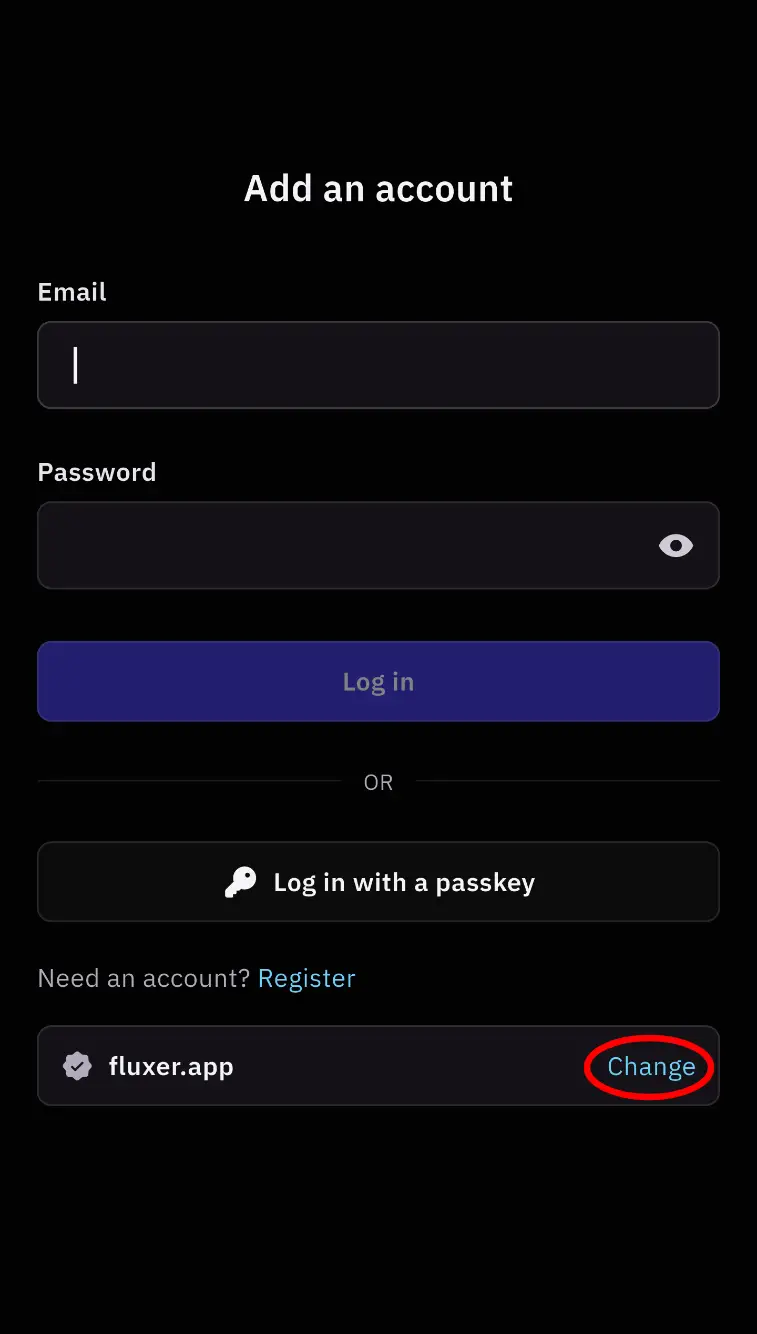
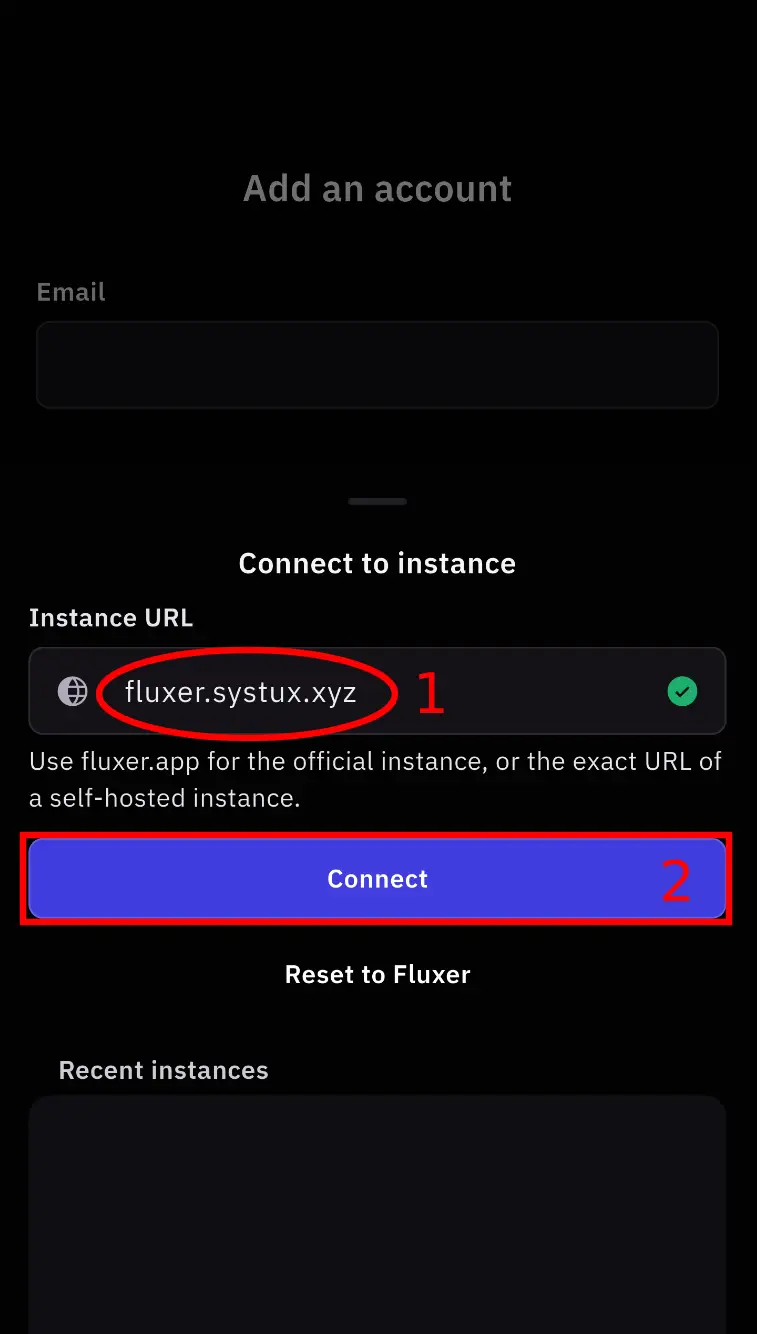
fluxer.systux.xyz, tap ConnectTap either screenshot to enlarge it.
What the script does
- Adds the official
pkgs.fluxer.compacman repository — the signing key's fingerprint is verified before import. - Installs the desktop app from that repository.
- Detects Wayland/X11 and NVIDIA/Intel/AMD, then writes matching Chromium flags.
- Points the app at your instance through a
.desktopoverride — no system files are touched.
Piping a script to a shell? Read it first — every installer is plain text at /scripts/.
Advanced knobs: DESKTOP_ONLY=1, ASSUME_YES=1, GPU=, SESSION=, EXTRA_FLAGS=.
All install commands
JavaScript is off, so here is every one-liner at once. They are preconfigured for https://fluxer.systux.xyz.
| Platform | Command | |
|---|---|---|
| Arch | curl -fsSL https://fluxer.systux.xyz/arch.sh | bash | Read |
| Debian / Ubuntu | curl -fsSL https://fluxer.systux.xyz/debian.sh | bash | Read |
| Fedora / RHEL | curl -fsSL https://fluxer.systux.xyz/fedora.sh | bash | Read |
| Flatpak | curl -fsSL https://fluxer.systux.xyz/flatpak.sh | bash | Read |
| macOS | curl -fsSL https://fluxer.systux.xyz/macos.sh | bash | Read |
| Windows | irm https://fluxer.systux.xyz/windows.ps1 | iex | Read |
iPhone: install TestFlight, then join the beta.
Android: pick the FCM build for a phone with Google Play services, or the UnifiedPush build for a degoogled one — every architecture is listed at fluxer.app/download/android. Obtainium keeps whichever you choose up to date.
Both mobile builds default to fluxer.app: on the login screen tap Change, enter fluxer.systux.xyz and tap Connect.